Simple Network Sniffer & Packet Analyzer
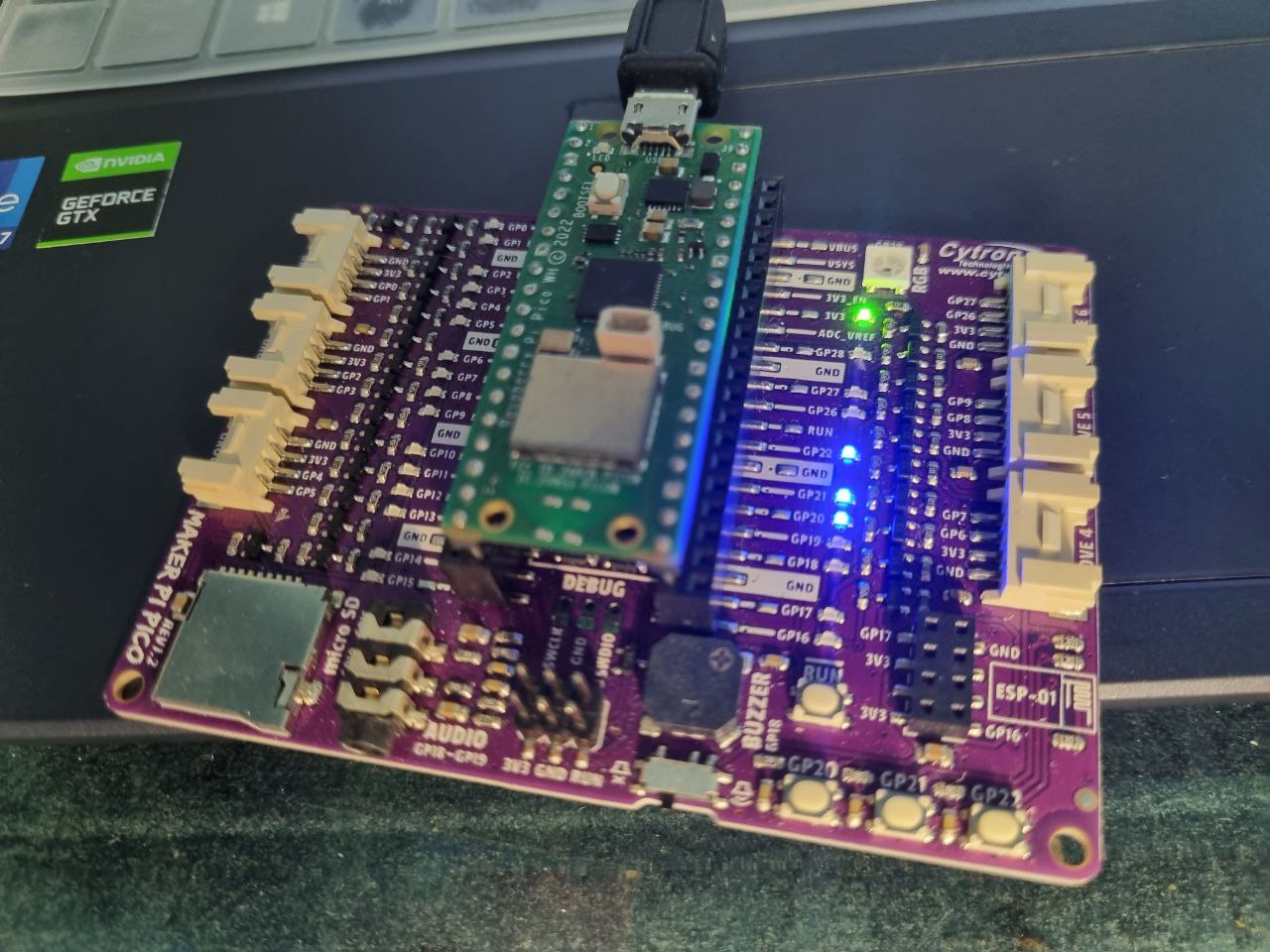
Network sniffer and packet analyzer for detecting malicious network activity and victim connections to rogue APs.
Implemented on a Raspberry Pi Pico W that captures MDPU frames by customizing firmware of the ESP32 WiFi module.
The frames are then parsed and analyzed for malicious activity, such as deauthentication attacks and rogue APs.
Overview of Functionality
- Real-time Packet Sniffing
- Data Storage with SD Card
- Web-based dashboard accessible through a Wi-Fi module to view captured data
- Console Interface to invoke backend functions directly
- Data parser for attack pattern matching
MDPU Frames
MDPU frames are a type of management frame used in Wi-Fi networks. They are used to manage the connection between devices and access points. By capturing these frames, we can analyze the network traffic and detect any malicious activity.
There are 3 categories of MDPU frames:
-
Management Frames – Used to establish and maintain the connection between devices and access points.
-
Control Frames – Used to control the flow of data between devices and access points.
-
Data Frames – Used to transmit data between devices and access points.
Each of these frames contains information about the network, such as the SSID, MAC address, and signal strength. By analyzing this information, we can detect any suspicious activity on the network. They have their own unique structure and are transmitted at different times during the connection process, with their own subtypes.
Raspberry Pi Pico W
To capture the MDPU frames, we used a Raspberry Pi Pico W, a microcontroller board based on the RP2040 microcontroller. The Raspberry Pi Pico W has built-in Wi-Fi capabilities, which allow it to capture the frames transmitted over the network.
Custom firmware was developed for the ESP32 WiFi module using the Nexmon project to enable promiscuous mode.
The Pico W comes with an SD card slot. A SD card is used to store the captured MDPU frames. The Raspberry Pi Pico W is connected to the ESP32 WiFi module via UART, which allows it to capture the frames transmitted over the network.
A list of APs and clients is maintained, along with the number of times they have been seen in the captured frames due to the limited memory of the Raspberry Pi Pico W.
Simple Frame Parsing Algorithm
A simple algorithm is used to parse the captured MDPU frames and extracts the relevant information from them. The algorithm is based on the structure of the MDPU frames and the information they contain.
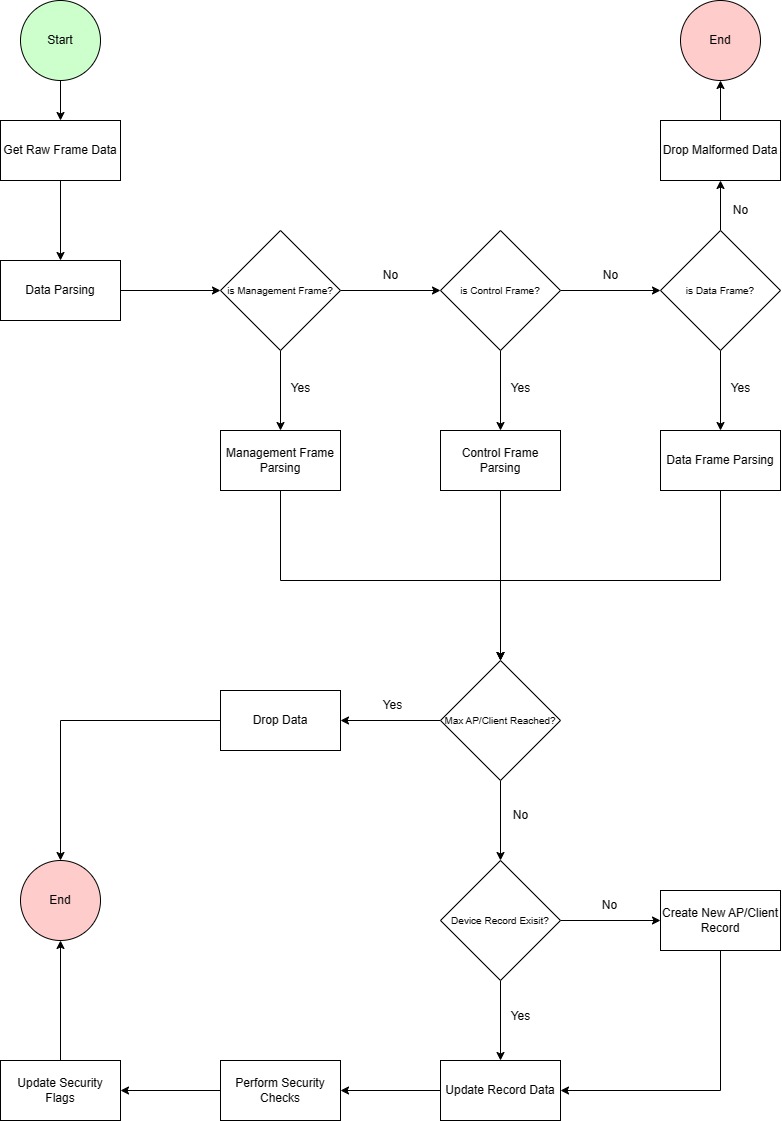
Different catergories of MDPU frames are parsed differently. If the max AP/Client count is reached, the oldest entry is removed. The parsed data is then stored in a data structure for further analysis.
Pattern Matching
The parsed data is analyzed against certain patterns of MDPU frames to detect malicious activity.
-
A temporary frame object is created in memory to store the parsed data.
-
Detect the frame type and subtype to create either an access point or client record object.
-
Perform pattern matching to detect malicious activity.
- Single frame subtype patterns
- Rogue Access Points
- Beacon Flood: Lure victims to connect to rogue AP
- Rogue Clients
- Probe Request Flood: Might indicate network scanning
- Authentication Flood: Might indicate authentication bruteforce on AP
- Rogue Access Points
- Sequential Frame Analysis
- Detect 4-way Handshake – Indicate connections between rogue AP and victim clients
- Single frame subtype patterns
-
Update flags in AP/Client record objects to indicate as rogue AP or victim client if a pattern is detected.
The pattern matching detection is limited to the following:
Rogue AP - Beacon Flood Detection
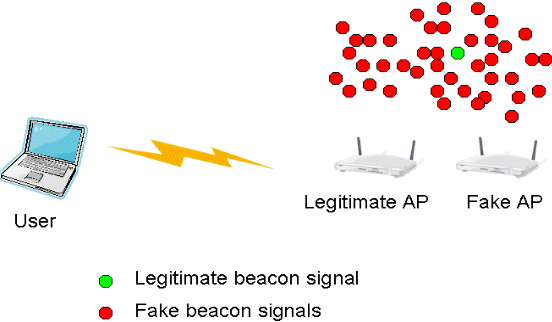
To trick users into connecting, rogue APs broadcast the same SSID as the legitimate AP. By flooding the network with deauth frames and beacon frames, they can force clients to disconnect from the legitimate AP and connect to the rogue AP. We can detect rogue APs through their high frequency of beacon frames and deauth frames.
Rogue Client - Probe Flood Detection
Probe flood attacks is detected by its large number of probe requests from a rogue client to the network to overwhelm the access point and prevent legitimate clients from connecting.
Rogue Client - Authentication Brute Force Detection
Authentication brute force attacks is detected by its large volume and frequency of authentication requests from a rogue client to the network to guess the password of the access point.
Handshake between Rogue AP and Client
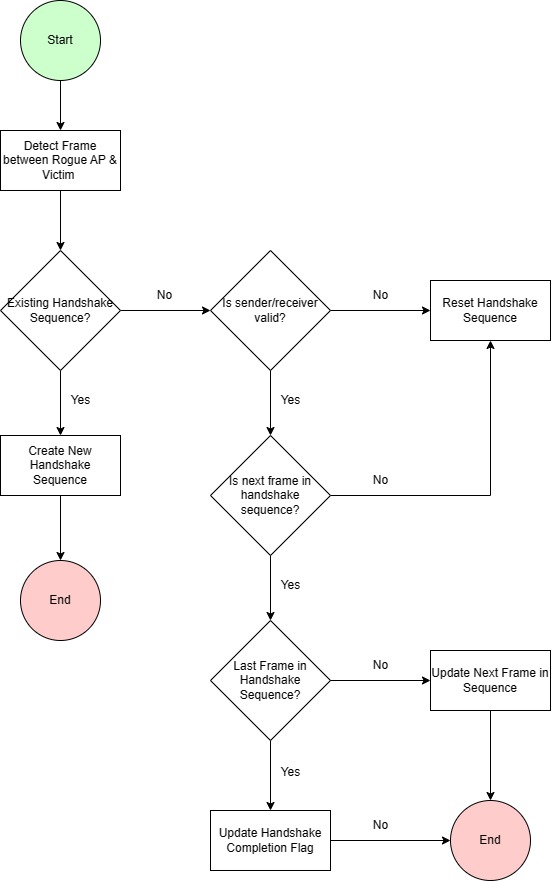
The handshake detection algorithm is based on the sequence of frames exchanged between the rogue AP and the victim client. The algorithm detects the handshake by analyzing the sequence of frames exchanged between the rogue AP and the victim client.
Psuedo code for handshake detection:
function check_handshake_sequence(client_record, ap_record, frame):
    if ap_record is None:
        if client_record is not rogue:
            rogue_ap_id = check_if_sending_to_rogue_ap(client_record, frame)
            client_id = client_record.id

            if rogue_ap_id is valid:
                handshake_index = find_existing_handshake_sequence(client_record, None)

                if handshake_index is invalid:
                    if frame is from client and is authentication frame:
                        initialize_handshake_sequence(rogue_ap_id, client_id)
                else:
                    handshake_sequence = get_handshake_sequence(handshake_index)
                    rogue_ap_mac_address = get_mac_address(rogue_ap_id)

                    if destination_mac_matches(rogue_ap_mac_address, frame):
                        next_frame_id = get_next_frame_id(handshake_sequence)

                        if next_frame_id matches frame subtype:
                            if last_frame_in_sequence(handshake_sequence):
                                mark_handshake_complete(handshake_sequence)
                            else:
                                increment_next_frame_index(handshake_sequence)
                        else:
                            reset_handshake_sequence(handshake_sequence)
    else if client_record is None:
        if ap_record is rogue:
            handshake_index = find_existing_handshake_sequence(None, ap_record)

            if handshake_index is valid:
                if handshake_index is 0:
                    return

                client_id = get_client_id(handshake_index)
                client_mac_address = get_client_mac_address(client_id)

                if destination_mac_matches(client_mac_address, frame):
                    increment_next_frame_index(handshake_sequences)
                else:
                    reset_handshake_sequence(handshake_index)